When you serve a page over HTTPS, you expect every element—images, videos, audio files—to travel over a secure channel as well. In reality, a surprising amount of legacy resources still point to HTTP URLs, creating mixed content that can expose users to downgrade attacks. Starting with Firefox 127, Mozilla’s browser will silently upgrade image, audio, and video sub‑resources from HTTP to HTTPS whenever possible. This shift closes a long‑standing gap in the mixed‑content model and brings tighter security guarantees without breaking most existing sites.
Why Mixed Content Matters
Even though 93 % of requests made by Firefox are already HTTPS, the remaining 7 % often consist of ancillary assets that were authored with plain‑HTTP URLs. When a secure page loads an insecure sub‑resource, a network attacker can tamper with that asset, inject malicious code, or simply observe user behavior. Historically browsers distinguished between active mixed content (scripts, iframes) and passive mixed content (images, video, audio). Active content was blocked outright, while passive content was allowed with a warning icon in the address bar.
The New Upgradable/Blockable Model
The latest revision of the Mixed Content Standard replaces the active/passive split with two categories:
- Blockable content – scripts, iframes, and newer features like responsive images that can affect page logic. These continue to be blocked when loaded over HTTP.
- Upgradable content – traditional passive elements (
<img>,<audio>,<video>). Firefox now attempts to fetch these over HTTPS first; if a secure version exists, it is used automatically. If the resource is unavailable via HTTPS, the request fails and the asset is omitted.
This behavior change also updates Firefox’s UI: the tiny warning badge that once appeared on the lock icon is gone. A fully green lock now signifies that all loadable content was either secure or successfully upgraded. 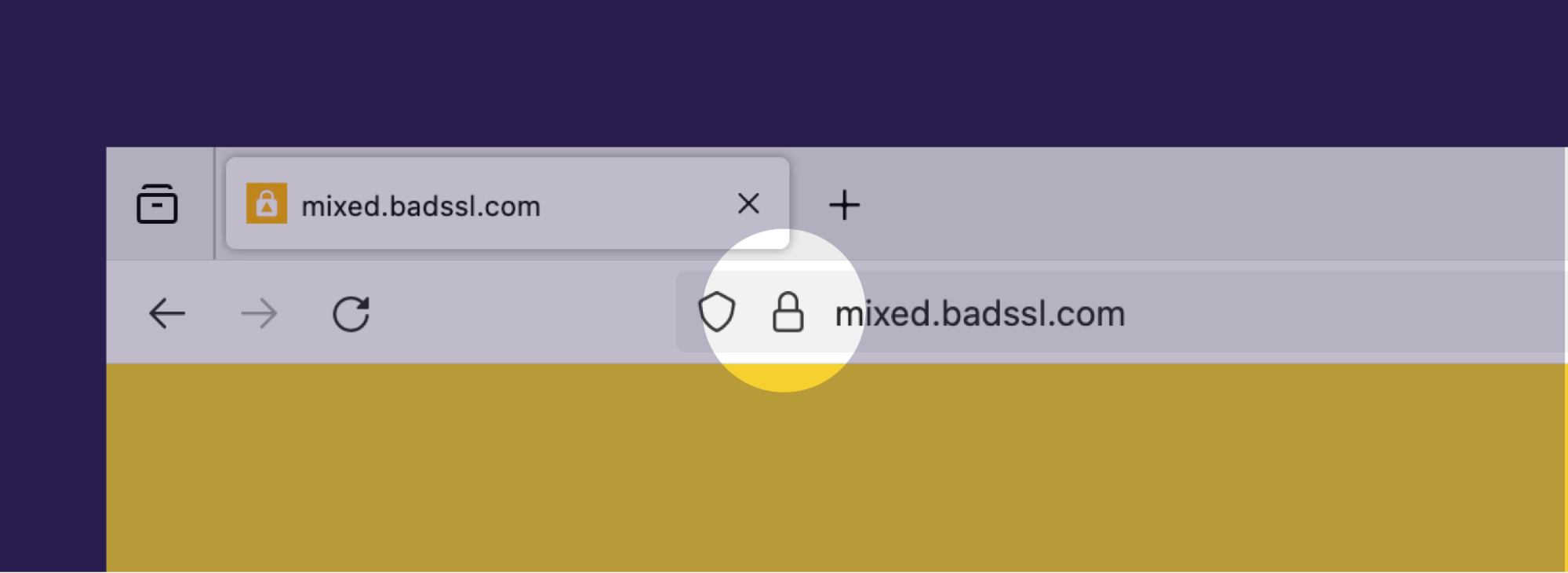
Practical Implications for Developers
1. Audit Your Asset URLs
Run a crawl of your production site (tools like wget, curl, or specialized scanners) to locate any hard‑coded http:// URLs in HTML, CSS, and JavaScript. Replace them with protocol‑relative URLs (//example.com/image.png) or, better yet, absolute https:// URLs. This ensures that Firefox’s upgrade path works seamlessly.
2. Leverage Content‑Security‑Policy (CSP) `
Add a CSP directiveupgrade-insecure-requests` to tell browsers to rewrite insecure URLs on the fly. While Firefox 127 performs the upgrade automatically for media elements, CSP gives you a broader safety net covering other resource types.
3. Test Fallback Scenarios
If a resource truly lacks an HTTPS endpoint (e.g., a third‑party CDN that only serves HTTP), Firefox will now drop it. Verify that the absence of such assets does not break UI layout. Use srcset or <picture> with fallback images hosted on HTTPS, or consider self‑hosting critical media.
4. Monitor Performance Impact
An extra HTTPS handshake may add latency, especially for resources that are not cached. Use HTTP/2 or HTTP/3 and enable preconnect (<link rel="preconnect" href="https://example.com">) to mitigate the cost of the upgrade.
Enterprise Considerations
Organizations with legacy intranets might still rely on HTTP‑only assets. Firefox provides two preferences to control the new behavior:
security.mixed_content.upgrade_display_content = false– Keeps the old insecure loading (and the degraded lock icon).security.mixed_content.block_display_content = true– Blocks all mixed content, including the newly upgradable types.
These settings are not recommended for general users because they deviate from the interoperable web platform and receive limited support from Mozilla. If you must use them, document the rationale for your team and test thoroughly before rolling out.
Looking Ahead: HTTPS‑First and HTTPS‑Only Modes
Firefox’s mixed‑content upgrades are part of a broader push toward HTTPS‑First browsing. Future releases will default the address bar to HTTPS, falling back to HTTP only when the secure version fails to load. This feature is already available in Firefox Nightly. Moreover, the strict HTTPS‑Only Mode forces every request to use TLS, blocking any fallback to HTTP. Enabling this mode is a one‑click option in the settings and is ideal for security‑conscious environments.
Key Takeaways
- Firefox 127 will automatically upgrade
<img>,<audio>, and<video>resources from HTTP to HTTPS when a secure version exists. - Active content (scripts, iframes) remains blockable; developers should continue to serve those exclusively over HTTPS.
- Audit and update all hard‑coded HTTP URLs to avoid broken assets after the upgrade.
- Use CSP
upgrade-insecure-requestsas an additional safeguard. - Enterprise admins can tweak the upgrade behavior via
security.mixed_content.*preferences, though it is discouraged. - The upcoming HTTPS‑First and HTTPS‑Only modes will further lock down the browsing experience.
Conclusion
The mixed‑content upgrade in Firefox 127 marks a subtle yet powerful step toward a fully encrypted web. By proactively cleaning up insecure asset references and leveraging modern security headers, developers can ensure their sites remain functional—and fully secure—across all browsers. Embrace the change now; the future of web security is already arriving in Firefox’s next release.
Source: Firefox will upgrade more Mixed Content in Version 127
Automated Transmission
This entry was synthesized and populated dynamically using native API integrations.